Functional Requirements
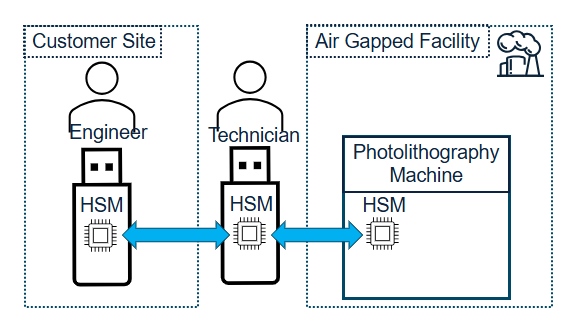
This section defines the functional requirements of your design. The requirements are presented as a series of steps that define functionality your system must implement. For each step, a Host Tool provided by the organizers and run on a Host Computer will be invoked to interact with the Hardware Security Module (HSM).
The functionality described in each step will be verified by the organizers during Handoff, and you must follow all requirements to advance to the Attack Phase.
See Reference Design for details about how the MITRE-provided Reference Design implements the Functional Requirements.
Note
The functional requirements described here are intentionally high level. See the Detailed Specifications for detailed requirements including tool inputs, outputs, and environments.
Build HSM System
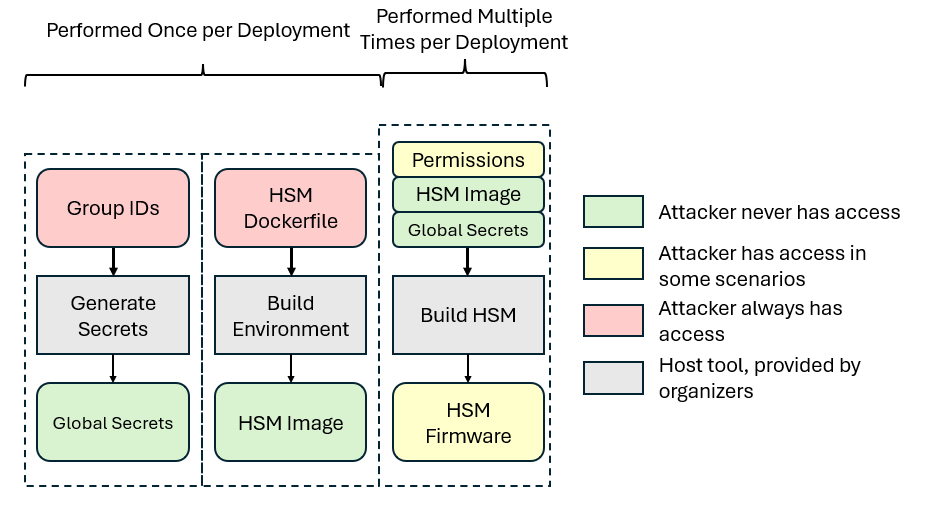
This build process is broken into multiple steps:
Your team must implement each of these steps to create a set of HSMs.
Build Environment
The Build Environment is where all of your project’s dependencies are installed including compilers, packages, and any other build tools you may need. These dependencies must be installed utilizing Docker. This step will be run once for each design, such that the successive build stages can run as intended.
The environment is built by invoking docker build -t build-hsm ., which will
build the docker image defined by the dockerfile. You may customize the
environment build process by modifying the dockerfile to install dependencies
for your build process.
This year, teams will have control over a docker container environment, which will be used for building the HSM firmware.
Note
If you don’t change the programming language of your design or add additional build tools, it is possible that the Build Environment step of the Reference Design will be sufficient for your design without modification.
Build Deployment
Next, you will create a deployment that represents an entire fabrication run of
components created by the manufacturer. During this step,
gen_secrets.py is invoked by the user to generate initial data required for
building and provisioning the system.
The resulting files are known as the Global Secrets. They will be provided to the subsequent build processes of the Hardware Security Module (HSM) and used to generate file objects. The Global Secrets may include cryptographic key material, seeds, entropy, or any other data needed to build your design. Global Secrets should be treated as read only after generation; the build process must not add new secrets to the Global Secrets.
All HSMs that use the same Global Secrets are known as a “Deployment.” HSMs within a validly-built Deployment must be able to work together according to the Detailed Specifications. The behavior of interaction between HSMs from different deployments is undefined and will not be tested.
During the Attack Phase, one Deployment will be built with multiple firmware images (see Attack Phase Flags and Scenarios). Attackers will never have access to the Global Secrets.
Build HSM
Once the environment and deployment have been built, you may now build the
HSM, which is done by using the relevant
Host Tool. HSMs must be able to be
built in any order and may read from the Global Secrets as needed. This year,
a secrets_to_c_header.py file has been included to package the Global Secrets
into the final firmware. This file may be edited as needed according to the
secrets generated by the individual design.
The HSM will be built with the following command:
docker run --rm -v ./firmware:/hsm -v ./global.secrets:/secrets/global.secrets:ro -v ./build:/out -e HSM_PIN='1a2b3c' -e PERMISSIONS='1234=R--:4321=RWC' build-hsm
Which will place the HSM source code at /hsm in the container and the global
secrets, which should be a file, at /secrets/global.secrets. The HSM Pin and
Permissions will be defined with the environmental variables HSM_PIN and
PERMISSIONS.
Note
The Global Secrets are read-only, and may not be modified while building an HSM!
The built HSM firmware should be placed at /out/hsm.bin. There will also be an ELF
file, which you may also use for your own debugging purposes. The file build.sh
should do all of this setup for you as detailed. If you change that file, make sure it
is still in compliance with the above instructions.
HSM Functional Requirements
With a functioning HSM, the system should now be ready to accept commands from the eCTF Tools to the Hardware Security Module (HSM). The HSM you design must respond to the following six commands. Detailed requirements of these commands are listed in the Detailed Specifications.
List Files Command
The list files command is pin protected. It shall return the metadata associated with all files on the HSM.
Read File Command
The read file command is pin protected. To read file data, the HSM must have correct permissions for that file’s group. The HSM must return the file name (padded with null bytes) and the file contents.
Write File Command
The write file command is pin protected. To write file data, the HSM must have correct permissions for that file’s group. If a file is written to a slot of the device that already contains a file, the old file should be overwritten and the HSM should only retain the latest file provided.
Files must be stored in a way that they persist on the HSM after it loses power. The requirement applies to reboots that happen when the HSM is listening for new commands from the host (as opposed to reboots that take place while processing a command). For example, both lists in the following scenario must return the same files.
Flash design
Write file to slot 3
List files
Power cycle
List files
The HSM does not need to store more than 8 files. Any files written written to an HSM should still be useable even if the same firmware/files were moved to a different physical device.
Note
The below commands rely on cross-board communications. Details on connecting two boards together can be found on the Connecting A Debugger page.
Listen Command
The listen command is not pin protected. This command places the device in a “listening mode” such that it can respond when it receives an Interrogate or Receive message. Each listen command must handle exactly one command from a neighbor HSM.
The HSM receiving the listen command should be available to receive commands from another HSM as soon as they receive the listen and should be available to receive another host command as soon as the cross-HSM command completes.
Interrogate Files Command
The interrogate command is pin protected. This command interacts with a second HSM connected via UART to list the contents of the adjacent HSM. It shall return the metadata associated with all files on the neighbor HSM for which the local HSM has receive permissions.
Receive File Command
The receive command is pin protected. This command interacts with a second HSM connected via UART to receive a file from the adjacent HSM. If the local HSM has permissions to receive the group of the requested file, it will write the file to a slot. All file data must be transferred (name, UUID, group, contents).