Submission Process
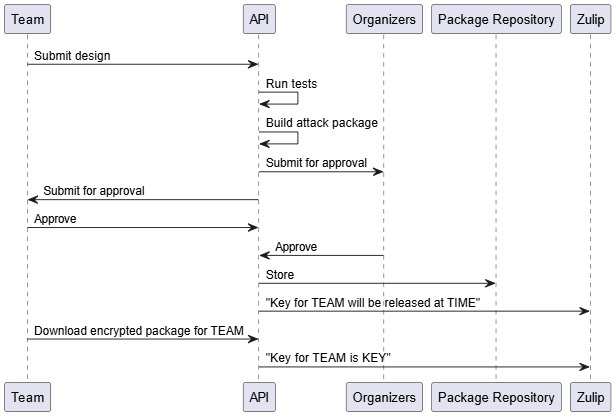
When a team has finished testing their design using the Automated Testing Service they will want to submit their design to the Organizers in order to enter the attack phase. To do this they begin a “submission” flow on the testing service. The service will verify the functional correctness of the design (using the same tests) and if it passes will package the design and then wait for both team and organizer approval. Once a design has been successfully submitted by a team this flow cannot be used again by that team.
Submission Sequence
Approval Process
When submitting a design, apart from the jobs that test functional correctness and
generate the package, there will be two additional jobs: team_approval and
organizer_approval. These will be “pending” jobs which means they won’t start
until input is provided. What this means for a team who would like to submit is that it
is their responsibility to look through the generated attack package and make sure that
they are satisfied with having that package sent out to other teams during the attack
phase. The package is the output of the public_attack_package_contents job. Download
it with:
# use the UUID of the public_attack_package_contents job
uvx ect api submit get 00000000-0000-0000-0000-000000000000 final_package.zip
Once a team has decided that they are happy with the attack package that was generated and would like to finalize their approval they should create a json file with the following body:
{"approve": true}
And then run the following command from ectf public tools:
#                        { team_approval job_id }           { path to json file }
 ectf api submit update 00000000-0000-0000-0000-000000000000 ./approval.json
Where the the team will replace the job id with the job id of team_approval and provide the correct path to the approval json file.
Warning
Teams are not allowed to modify their designs after approving the handoff package, so be sure to look through everything before approving. There are no take backs!
In this example a team would be accepting their attack package.
If instead a team would like to reject their attack package they would set
approve to false in the body of the json file.
{"approve": false}
This would cause the current submission to fail allowing the team to update their design and submit again.
The organizer_approval job is the same except it is only for the organizers to approve or reject a team’s design. This job is marked private
which means that team’s can’t interact with it. Just like the other approval job if it has completed it means the organizers have accepted the design,
if it has failed it means the organizers have rejected the design, and if it’s still pending it means the organizers have not finished reviewing the
package. A design is only cleared for submission when both the team and the organizers approve the attack package.
Warning
Organizers will reject any design that does not have the final Design Document at the root of the git directory, no exceptions will be made.
The submit flow only succeeds if both the team and organizers approve of the package. When it gets approved there a message will be immediately posted to Zulip informing all teams in the attack phase how long until this submitting team enters the attack phase. Along with that the encrypted attack package will become immediately available for download, and the associated key to unencrypt will be posted to Zulip the moment this team enters the attack phase.
Submission Sequence
Submission Entry Time
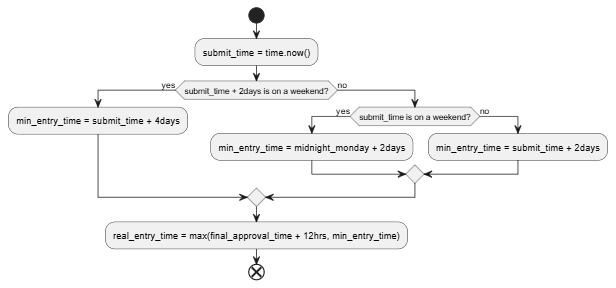
A team will officially enter the attack phase a minimum of 48 hours after the start of their submission (not including weekends). It may take longer then 48 hours if a team does not approve their package in a timely manner. This is because we give a minimum of 12 hours notice to teams in the attack phase that a new team is joining. This means that if team approves their package within 12 hours of their normal attack entry time, we delay their entry to be 12 hours from their approval time.
The flow chart below gives the full logic for attack phase entry: